When you calibrate analog sticks fix stick drift android problems in the right order, half the “broken” controllers turn out to be healthy hardware wearing bad software settings. True drift — the stick reporting movement nobody asked for — has exactly three root causes: a worn or dirty potentiometer, a mis-centred calibration, or a dead zone too small for an ageing stick. This guide separates the three, because each has a different fix and only one of them means opening the controller.
Diagnose first: calibrate analog sticks fix stick drift android symptoms by type
Install any gamepad tester that draws stick position live (several free ones exist) and watch the resting dot for sixty seconds.
| What the tester shows | Diagnosis | Correct fix |
|---|---|---|
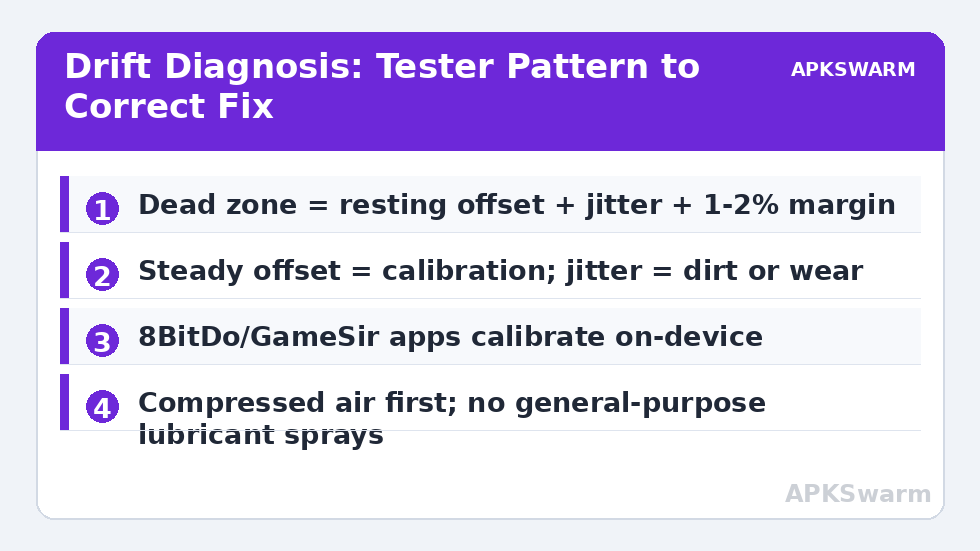
| Dot sits a few % off-centre, steady | Calibration offset | Recalibrate centres (below) |
| Dot jitters around centre, ±2–5% | Dirty/worn potentiometer tracks | Cleaning, then dead zone |
| Dot sits hard against one edge | Stuck axis or failed sensor | Hardware repair/replacement |
| Dot perfect in tester, drift in one game | Game’s internal dead zone ~0 | Raise in-game/emulator dead zone |
| Drift only at full tilt in one direction | Worn gate/track at extreme | Lower outer dead zone / sensitivity cap |
| Drift appeared after a drop | Dislodged stick cap or cracked housing | Reseat cap; inspect before calibrating |
Note the raw percentage the tester reports at rest — you will set your dead zone from this number, not from a forum recommendation. The same tester-first method opens fix unresponsive dpad button binds android, because guessing wastes more controllers than wear does.
Calibration paths by brand
Xbox controllers: true recalibration lives in the Xbox Accessories app on Windows/Xbox; on Android you can only compensate with dead zones in apps that offer them. DualSense: Sony offers no user calibration tool; compensation is via emulator/app dead zones, and persistent offset under warranty is a return, not a project. 8BitDo (Pro 2, Ultimate family): the Ultimate Software app includes stick calibration and dead-zone controls stored on the pad — follow the in-app routine of rotating sticks slowly to the gates twice, then centring; details in 8bitdo pro 2 setup android guide. GameSir: the GameSir app offers calibration for its telescopic and standard pads. Nintendo-style pads: Switch itself has a calibration screen, but that calibration lives on the console, not the pad, so it does nothing for Android use. On telescopic pads (Backbone, Kishi), there is no user calibration at all — dead-zone compensation in the emulator is the entire toolkit.
Dead zones: setting the number like an engineer
Rule: dead zone = resting offset + jitter amplitude + 1–2% margin. If your stick rests at 3% with ±2% jitter, a 6% dead zone kills drift while keeping fine aim. Costs rise fast past ~10%: slow camera pans and subtle racing corrections start to feel stepped. In RetroArch the setting is Input → Analog Deadzone per device; PPSSPP and Dolphin expose their own; in native Android games you are at the mercy of the developer, which is one reason emulator players notice drift “only in shooters.” Outer dead zone matters too: ageing sticks that stop reaching 100% at the gate make sprint-by-tilt and full-lock steering fail; lowering the outer zone to 90–95% restores full output before the physical stop. Test both numbers in the tester after setting them, in-game menus lie.
All figures are estimates based on typical titles and stock settings; individual games vary widely.
Cleaning a potentiometer stick without opening the shell
- Power the controller off and remove batteries if it has them.
- Pull the stick cap straight up (most caps are friction-fit; if yours resists firmly, check your model’s teardown note first — some are glued).
- With compressed air, blow short bursts around the exposed stick base while rotating the stick through its full circle; this evicts the dust and plastic wear particles that cause most jitter.
- If jitter persists, a drop of contact cleaner formulated for potentiometers/electronics (not general WD-40, which leaves residue) on a cotton bud around the base, worked in by rotating the stick, is the standard last non-invasive step.
- Re-test for a full minute. Improvement that fades within a day means the carbon track itself is worn — no spray reverses that.
Opening the controller to replace stick modules is a real option on popular pads — replacement modules are cheap and soldering is moderate-difficulty — but it voids warranties and is brand/model-specific enough that it belongs in model teardowns, not a general guide. Hall-effect replacement modules exist for a few famous pads and permanently remove wear-drift; compatibility is exact-model only, verify before ordering.
Preventing the next drift
Drift is wear, and wear is friction over time — but two habits accelerate it brutally: storing pads loose in bags where sticks sit pressed at an angle for weeks, and click-heavy play styles that grind the stick while pressed (L3 sprint in shooters). A hard case and, where the game allows, remapping sprint to a back button or bumper — the back-button method from gamesir x2 pro android setup guide — can double a stick’s comfortable life. Hall-effect pads (several GameSir and 8BitDo newer models) sidestep wear entirely and are the rational upgrade when replacement time comes. Meanwhile the Controller Setup section tracks which current models use which sensor type.
Reading drift by game genre: when “a little” is too much
Whether your measured drift matters depends on what you play, and calibrating your tolerance honestly saves needless repairs. Menu-driven RPGs and turn-based games forgive drift up to ~8% resting offset — the cursor wanders occasionally, you nudge it back, nothing is lost. Racing games sit in the middle: a 4% offset biases steering constantly and shows up as a car that needs permanent correction on straights, which players misdiagnose as alignment settings. Shooters and precision platformers are merciless — a 3% offset with jitter defeats aim assist dead zones tuned by developers who assumed healthy hardware, and no in-game sensitivity setting separates your intent from the stick’s noise. The practical workflow: measure your pad once with a tester, write the numbers down (resting offset per stick, jitter range), and consult them when a new game “feels wrong” before touching its settings. A pad at 2% steady offset is healthy for years of play in every genre; a pad at 6% and climbing is in its final season for competitive use, whatever the cleaning routine achieves, and the sensible money move is planning its replacement — ideally a Hall-effect model whose resting numbers stay at ~0% for its whole life — rather than escalating interventions on a wearing carbon track.
Record-keeping: your pad’s health file
Keep the tester’s resting numbers with a date, somewhere boring like a notes app. A stick that moved from 1% to 3% in a year is ageing gracefully; one that jumped 1% to 7% in a month has taken damage or is failing electrically, and the note is what lets you tell the difference instead of arguing with your own memory.
Frequently Asked Questions
Can stick drift be fixed without opening the controller?
Often, yes. Calibration offsets respond to recalibration where the brand offers it, jitter from dust responds to compressed air and potentiometer-safe contact cleaner, and mild wear is fully masked by a correctly sized dead zone. A stick resting hard at one edge is a hardware failure.
What dead zone should I set for a drifting stick?
Measure the resting offset and jitter in a gamepad tester, add them, plus 1–2%. A stick resting at 3% with ±2% jitter needs roughly 6%. Avoid blanket 15–20% settings; they destroy fine control.
Does increasing the dead zone fix drift in every game?
Only where you can set it. Emulators expose dead-zone controls; many native Android games do not, so drift may be fixable in RetroArch yet unavoidable in a particular native title.
Are Hall-effect sticks immune to drift?
They are immune to wear-drift because nothing rubs — position is sensed magnetically. They can still arrive miscalibrated or be damaged, but the classic ageing drift of potentiometer sticks does not occur.
Why did drift appear right after I dropped my controller?
A drop can shift the stick cap on its post or crack the module housing, changing the centre mechanically. Reseat the cap and re-test before recalibrating; calibrating around a mechanical shift masks a problem that will worsen.