The TrimUI Smart Pro is a wide, comfortable Linux handheld with a 4.96-inch 720p screen, an Allwinner A133P under the hood, and a stock operating system that undersells all of it. CrossMix OS — a community firmware built on TrimUI’s own base — is the upgrade most owners make within the first week: better emulators, a proper apps system, sane defaults and tools the stock build simply does not have. This trimui smart pro setup crossmix guide covers the safe install, the settings worth changing afterwards, and an honest account of what the hardware can and cannot play.
Everything here assumes your own library: games you dumped from cartridges and discs you own, and homebrew — including the ports CrossMix makes easy, which still need your own legally obtained game files where a port requires them. Build the card around your dumps, and your saves and exact game versions are what travel between devices later.
Before You Flash: The Backup That Makes It Safe
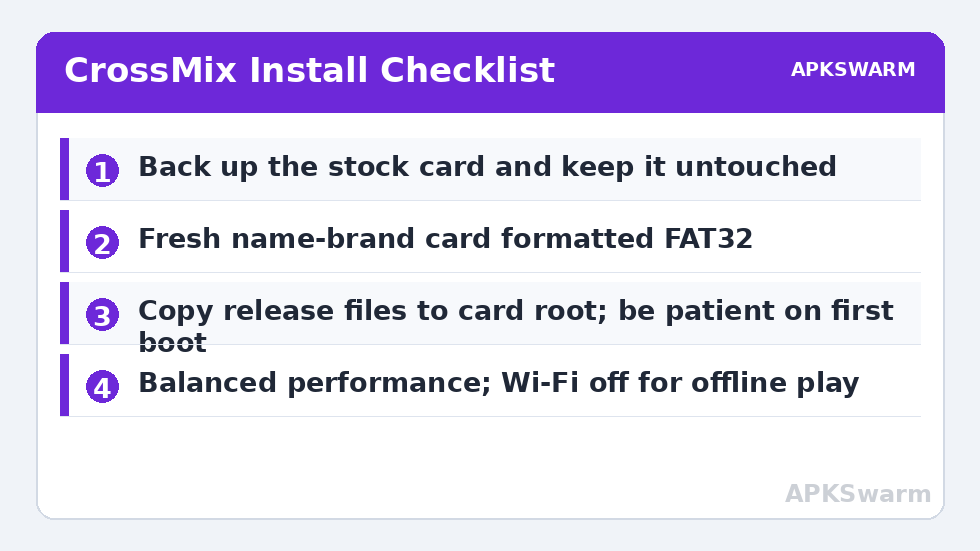
Firmware on the Smart Pro lives entirely on the microSD card, which makes this whole process wonderfully reversible — a failed flash cannot brick the device, because the stock card in a drawer is always a working handheld. That safety only exists if you respect it: before touching anything, copy the stock card’s contents to your PC, and do the flashing work on a fresh, name-brand card (64 GB is a comfortable size; 128 GB if your PlayStation collection is large). Counterfeit and bundled budget cards are the leading cause of mysterious corruption in this hobby — test a new card with H2testw or F3 before trusting it.
The general discipline transfers from every other firmware project on this site: our guide to flashing ArkOS and ROCKNIX firmware safely covers imaging with verification, ignoring Windows’ format prompts on Linux partitions, and first-boot patience. CrossMix follows the same rules even though its installation method differs in detail.
Installing CrossMix OS, Step by Step
Unlike a raw disk image, CrossMix installs as a file copy onto a correctly formatted card, which makes the procedure gentler than most firmware swaps:
- Format the fresh card as FAT32 with a proper formatting tool — Windows’ built-in formatter refuses FAT32 above 32 GB, so use a dedicated utility.
- Start from the correct base: CrossMix builds on TrimUI’s official stock firmware files. Follow the current CrossMix release instructions for whether your install needs the stock base copied first — this detail changes between releases, and the release notes are the authority.
- Copy the CrossMix release files to the card root exactly as packaged, preserving the folder structure.
- Insert the card, boot, and be patient. First boot performs setup work; a long first start is normal, a reason to wait rather than to power off.
- Verify the basics — Wi-Fi connects, the apps menu opens, a game from your own library launches — before copying your whole collection across.
When it boots cleanly, copy your games into the standard per-system folders, point nothing anywhere else, and keep the stock card untouched in its drawer. Your exit route stays open forever.
First Settings Inside CrossMix
CrossMix’s value is concentrated in a handful of places. Work through the system apps it adds: the CPU and performance controls let you match effort to system (the A133P does not need to work hard for Game Boy, and should not be asked to pretend it is a GameCube chip). Set your timezone and Wi-Fi, enable RetroAchievements inside RetroArch with your account if you use it, and configure scraping for box art once your folders are final — not before, unless you enjoy scraping twice.
| Setting area | Sensible default | Why |
|---|---|---|
| Performance mode | Balanced / per-system | Light systems sip power; PS1 gets what it needs |
| Screen brightness | Mid range indoors | The single biggest battery lever on this device too |
| Wi-Fi | On for scraping/Achievements, off for pure offline play | The radio is a real standby and session cost |
| RetroArch video | Integer scaling for handheld-native systems | The 720p panel makes GB/GBA and PS1 look crisp |
| Sleep behaviour | Short screen-off, honest shutdown for storage | Linux handheld sleep is a convenience, not a week-long state |
Owners arriving from the Miyoo world will find the philosophy familiar — our Miyoo Mini Plus OnionOS setup guide pursues the same goals (instant resume, curated apps, honest battery settings) on smaller hardware. CrossMix simply has a bigger screen and a bit more chip to pursue them with.
What the Smart Pro Plays Well — Honestly
The A133P’s honest territory is PlayStation and below, played very well: 8-bit and 16-bit systems are flawless, GBA is excellent on the wide screen, and PS1 is the device’s home ground. Nintendo DS runs respectably for many titles in the standalone emulator CrossMix provides, with the widescreen used for side-by-side or swapped-screen layouts. PSP is the negotiation zone: lighter 2D and less demanding 3D games can be enjoyable, heavy 3D titles are beyond the chip, and N64 and Dreamcast are selective highlights rather than libraries. Saturn remains, as everywhere, a specialist pursuit.
Before blaming a specific game, sanity-check the load it creates: the frame calculator on the APKSwarm homepage estimates what a system demands at a given resolution, which separates “this chip cannot do this” from “this setting is wrong” in about ten seconds.
All figures are estimates based on typical titles and stock settings; individual games vary widely.
PortMaster, Apps and the Extras Worth Having
CrossMix’s app ecosystem is its quiet advantage. PortMaster brings a catalogue of native Linux ports and source ports to the device — each still requires your own legally obtained game data where the original game is needed, which the port pages state plainly. A file manager, a proper terminal for the curious, and media tools round out a system that feels maintained rather than frozen. Install extras one at a time and test as you go; a handheld you configured incrementally is one you can also repair incrementally.
Round out the day with longevity. The Smart Pro’s battery typically delivers community-reported sessions in the region of 4–6 hours of mixed retro play depending on brightness, Wi-Fi and how hard the chip is working — and its lifespan over years is governed by the habits in our guide to handheld battery health and charging habits: avoid habitual fast charging, do not store it flat or full for months, and top up before long trips rather than after deep discharges. Finally, if your other handheld is an Android device, the contrast is instructive — the ES-DE frontend setup guide shows the same library discipline running under a very different operating system, and your standard folder layout means the same card structure serves both worlds with minimal translation.
Hotkeys, Saves and Day-to-Day Living
Two final configuration passes make the device feel finished. First, one hotkey scheme everywhere: in RetroArch set Select as the hotkey modifier, Select + R1 to save a state, Select + L1 to load, Select + Start for the menu, and a fast-forward toggle you can reach without contorting your hands. Consistency matters more than the specific choices — your fingers should never need to relearn a system because you switched from SNES to PlayStation. Second, protect the saves: CrossMix keeps them on the same card as everything else, so copy the save and state folders to your PC monthly, and always before a CrossMix version upgrade. The upgrade path is designed to preserve your library, but a two-minute copy is the difference between an update and an anecdote. While you are in the folders, delete nothing you do not recognise — Linux firmwares keep small configuration files beside content in ways that are not obvious from a file manager, and tidiness enforced blindly has broken more setups than clutter ever has.
Frequently Asked Questions
Will installing CrossMix OS void my stock setup?
No. The firmware lives on the microSD card. Keep your stock card untouched and reinserting it returns the device to exactly its factory behaviour. Do the CrossMix install on a fresh, name-brand card.
What card size and format does CrossMix need?
The card must be formatted FAT32 — use a dedicated formatting tool for cards above 32 GB, since Windows will not offer FAT32 there. 64 GB suits most libraries; 128 GB if your PlayStation collection is extensive.
Can the TrimUI Smart Pro play PSP, N64 and Dreamcast?
Selectively. Lighter PSP titles and a share of the N64 and Dreamcast catalogues are playable; heavy 3D games on all three exceed the A133P. Build expectations around PS1 and below, where the device is genuinely excellent.
How long does the Smart Pro battery last with CrossMix?
Community reports typically land around 4–6 hours of mixed retro play. Brightness, Wi-Fi and system choice move that figure most — PS1 at mid brightness with Wi-Fi off sits at the long end.
Does CrossMix support RetroAchievements?
Yes, through RetroArch’s built-in support. Connect to Wi-Fi, sign in inside RetroArch’s achievements settings, and use supported cores. Hardcore mode disables save states during achievement play, which is the authentic way to earn them.