The controller worked perfectly last night. The procedure below will fix controller input mismapping after sleep mode wakes, at the right layer. This morning the phone woke up, the pad reconnected on its own — and now A and B are swapped, the triggers act like buttons, and one stick drifts through menus by itself. Efforts to fix controller input mis-mapping after waking a phone from sleep focus on a specific weak point in Android’s Bluetooth and USB handling: when the system sleeps, input devices are torn down and re-registered on wake, and the key layout — the file that translates a controller’s raw codes into Android buttons — can be re-matched incorrectly, applied late, or replaced by a generic layout. Nothing is broken; the phone has essentially forgotten which controller this is. The fix is to make it remember, in the right order.
Diagnose the Layer: Reconnect, Layout, or the App?
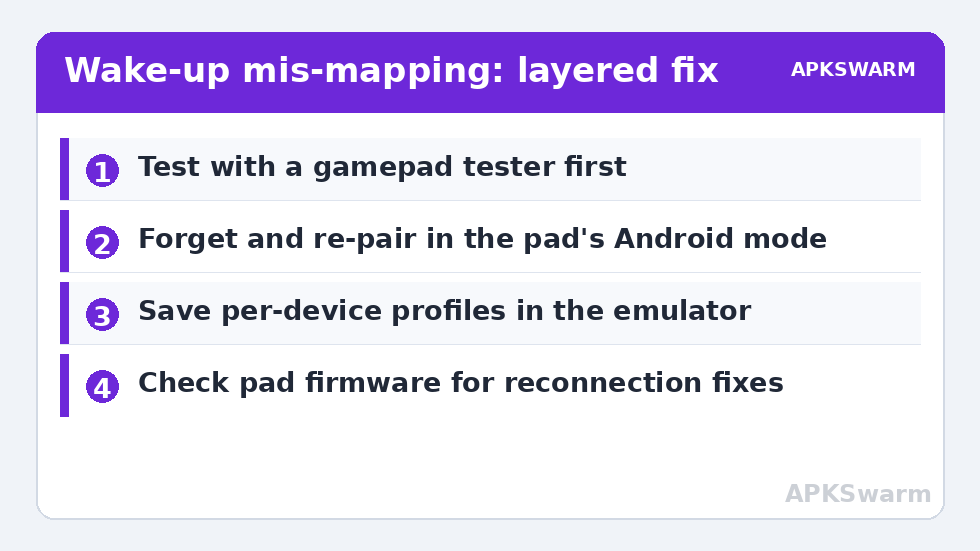
Three quick tests separate the causes. First, open a gamepad tester app (or the input display in an emulator) and press every button: if the tester shows wrong labels, the fault is at the system/layout layer. If the tester is correct but your game misbehaves, the app or emulator lost its own mapping profile — re-check its input settings before touching the system. Second, unpair and re-pair the controller: a clean re-pair that fixes everything points to a corrupted pairing/keylayout association from the wake cycle. Third, test a wired connection if the pad supports USB: correct behaviour wired plus wrong behaviour over Bluetooth confirms the Bluetooth reconnection path as the culprit, the same transport whose audio quirks are covered in Bluetooth audio sync delay.
Also note the pattern frequency: mis-mapping after every sleep suggests a systematic layout-matching problem (common with generic/no-name pads whose device IDs are ambiguous); mis-mapping once in a while suggests a race during fast reconnection, where the first app to grab input does so before the proper layout loads.
Fix Controller Input Mismapping After Sleep Mode Wakes: The Procedure
- Full re-pair, in the right order. Settings > Connected devices / Bluetooth: forget the controller entirely. Put the pad in pairing mode first, then pair fresh. Forgetting matters — a simple disconnect/reconnect reuses the suspect association. Many pads also have per-mode pairing slots (X-input vs D-input vs Switch/Android modes started with different button holds); confirm you are pairing in the pad’s Android/X-input mode per its manual, because the wrong mode presents a legitimately different layout that no phone setting can fix.
- Kill the reconnect race. After waking, give the phone a few seconds on the home screen before launching the game, letting services settle. If your pad supports it, reconnecting manually (tap it in Bluetooth settings) after full wake is more reliable than letting it auto-grab during wake.
- Remap at the app layer and save it. In your emulator, rebind using its per-device profile (RetroArch saves autoconfig profiles per controller; standalone emulators keep per-app mappings) and verify the profile name matches your pad. An app-layer remap survives system layout confusion because it corrects at the last step. Touch-side control problems are a different chain, handled in the touch input lag guide.
- Prevent the wake state that causes it. If mis-mapping only follows deep sleep with battery savers engaged, exempt your game/emulator and any controller companion app from battery optimisation so the Bluetooth stack and the app keep their relationship across sleep — the per-brand paths are in the battery optimisation guide. Some OEM skins also offer a “Bluetooth absolute volume / device compatibility” style toggle; the relevant one here is any setting that resets paired-device data — leave it off.
- Update the pad’s firmware. 8BitDo, GameSir, and similar brands ship firmware fixes for exactly this class of reconnection bug via their companion apps. Check once; it is the only step that can make the problem disappear permanently.
The rest of this diagnostic family is indexed under Performance Fixes.
All figures are estimates based on typical titles and stock settings; individual games vary widely.
Hardware Edge Cases Worth Ruling Out
Two impostors mimic wake-related mis-mapping. A failing stick or a pad with developing drift will look “possessed” in menus regardless of sleep, and waking is a coincidence; the tester app reveals this as noisy axes at rest, and the cure is calibration in the pad’s app or repair — not pairing rituals. And a pad paired to two hosts (your phone and a PC or console nearby) can reconnect to the wrong host or split its identity; clear unused pairings on the pad itself if it supports slot management. If neither applies and the system still confuses a mainstream pad after a clean re-pair, note it as a phone-firmware bug candidate: report it, and use the app-layer remap as your standing workaround. The broader escalation path is in the complete troubleshooting guide.
Confirming the Fix
Run the sleep cycle deliberately three times: play, sleep the phone for ten minutes, wake, reconnect, and check the tester before launching the game. Three clean cycles with correct labels at the system layer means the association is healthy again. Then verify inside your main emulator that its per-device profile loaded (the on-screen notification RetroArch shows, or the profile name in settings) — both layers correct is the definition of fixed here.
For Rooted Users: Key Layout Files, Briefly and Honestly
Android resolves a controller’s layout from files in /system/usr/keylayout/, matched by the device’s vendor and product IDs, falling back to Generic.kl when nothing matches. This is why ambiguity strikes no-name pads: they present generic or shared IDs, so the system legitimately cannot tell them apart from a different pad it met last week. Rooted users can add a custom .kl file keyed to their pad’s exact IDs (visible in a gamepad tester’s device info or via adb shell dumpsys input without root), which makes the correct mapping deterministic across sleeps and reboots. This is the one fix that addresses the root cause for ambiguous hardware, and the only one in this article that requires root — weigh it accordingly; for a mainstream pad with a vendor app and firmware updates, the firmware route above almost always lands first. Non-rooted users with a chronic offender pad have a simpler pragmatic option: dedicate the pad to the phone (remove its pairings elsewhere) so its identity is never contested.
Frequently Asked Questions
Why do my A and B buttons swap after the phone sleeps?
On wake, Android re-registers the controller and can apply a generic key layout or match the pad’s alternate mode, both of which present a different button arrangement. A full forget-and-re-pair in the pad’s correct mode, plus an app-layer profile in your emulator, makes the correct mapping stick.
Does this happen with wired controllers too?
Less often, but yes — USB devices are also re-enumerated after sleep, and a hub or cable that drops during sleep can return the pad as a “new” generic device. Test with a direct, known-good cable; if wired is always correct, concentrate your fixes on the Bluetooth path.
Will remapping inside the emulator survive?
Generally yes, because emulator profiles are keyed to the controller’s reported identity and applied after the system’s layout. If the pad starts reporting a different identity (wrong pairing mode), even the emulator profile will miss — which is why fixing the pairing mode comes first in the procedure.
My controller drifts in menus after sleep but is fine in games. Why?
Menus often lack the deadzone that games apply, so minor axis noise at rest — worsened by a wake-time calibration snapshot taken while a stick was not perfectly centred — becomes visible there first. Recentring the sticks, letting go before reconnecting, and applying the pad’s calibration routine usually clears it.
Is resetting network settings a good idea for this?
It is a blunt last resort: it clears all Bluetooth pairings and Wi-Fi networks, forcing clean re-pairing of everything. It can work when a single re-pair does not, but you will rebuild every pairing you own. Try the forget-and-re-pair on the one controller first.