A clamshell handheld lives or dies by its hinge — literally. The Retroid Pocket Flip folds its Dimensity 1100 and 6.1-inch-class touchscreen (5000 mAh battery, active cooling fan, Android 13) into a pocketable DS-shaped shell, and the two things that decide whether it lasts five years or five months are how you treat that hinge and how seriously you take heat in a sealed folding body. This retroid pocket flip thermal throttling care guide covers both: hinge mechanics and handling habits, the thermal behaviour specific to a clamshell, and the settings that keep performance stable through long sessions.
Context for owners comparing notes: the Flip shares its platform DNA with the RP4 Pro generation — same Dimensity 1100 class performance, active fan, hall sticks — but the folding shell changes the care equation. A slab handheld’s worst enemy is a drop; a clamshell’s is a drop plus everything the hinge endures daily: thousands of open-close cycles, pocket lint migrating into the seam, and heat with fewer escape routes when the lid is angled for play.
Hinge Mechanics: How to Open, Close, and Carry It
The Flip’s hinge is designed for the standard clamshell range with firm detents through the opening arc. Treat it the way you would a good laptop hinge, because mechanically that is the family it belongs to:
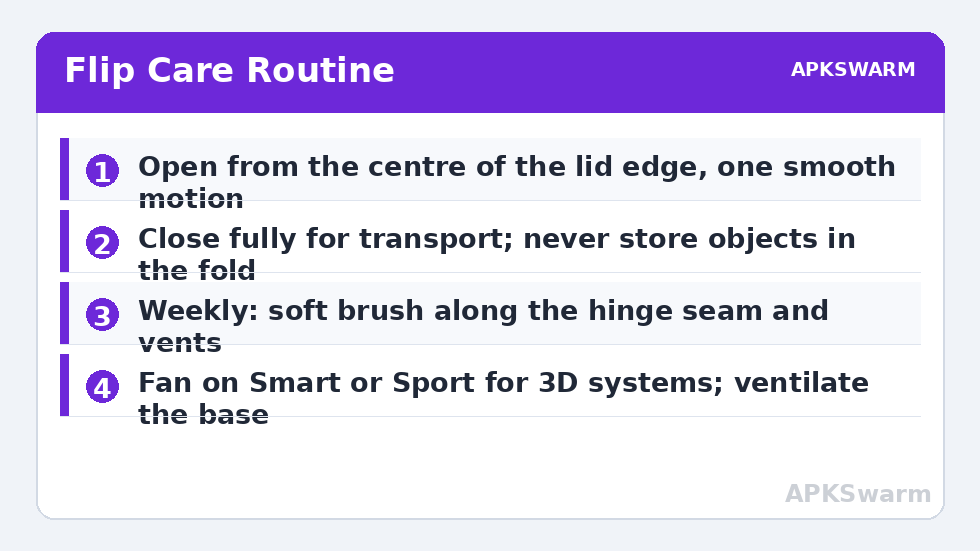
- Open from the centre of the lid edge, with one smooth motion. Opening from a corner torques the hinge asymmetrically — the habit that introduces play and creaks over time.
- Never force past a detent or the maximum angle. If resistance changes suddenly, stop and look: something (a cable of yours, grit, a case lip) is in the mechanism’s way.
- Close it fully for transport. The clamshell’s great virtue is that the screen protects itself; half-closed in a bag defeats it. A soft pouch still earns its place — grit between the screens scratches both surfaces, and pockets are full of grit.
- Keep the seam clean. A soft brush along the hinge gap weekly, and never compressed air at full blast straight into the mechanism — you can drive debris deeper and stress fan bearings on the vent path nearby.
- Watch the ribbon’s world: display and control signals cross the hinge on flex cables. Intermittent screen flicker or a column of odd pixels that changes with lid angle is a flex-cable symptom, not a screen fault — stop cycling the hinge and treat it as a repair conversation, ideally under warranty.
Thermals in a Folding Body
The Flip carries the same active cooling concept as its slab siblings — fan profiles in the quick settings (Quiet, Smart, Sport) and the Standard/Performance/High Performance modes — but the shape matters. Open at a natural play angle, the vents breathe and the device behaves like an RP4 Pro. Closed flat on a bed or cushion mid-download, or played with the base smothered in a blanket, the fan is recirculating against fabric and throttling arrives early. Typical expectations in open air mirror the sibling hardware: hours of stable play on PS1-era and below, GameCube and PS2 sessions that stay consistent on Smart fan, and heavy titles that eventually shed clocks in High Performance on a hot day — physics, not defect.
The care habits that prevent throttle-driven frustration are mundane: play with the base on a hard surface or in your hands (hands are heat spreaders and airflow), keep the fan on Smart rather than Quiet for 3D systems, and never charge at high wattage inside a closed case. Charging plus gaming plus enclosure is the triple that cooks batteries — the lithium reasoning in our Odin 2 battery guide transfers directly. Resting the device open, fan-side unobstructed, for a minute between heavy sessions also clears heat soak from the hinge-side internals better than a closed rest does.
Settings That Suit the Flip Specifically
Performance profile discipline from the RP4 Pro setup guide applies unchanged: Performance mode as home, High Performance per-title. Two Flip-specific additions. First, lid behaviour: decide what closing the lid should do (sleep is the sane default) and set it deliberately, because a clamshell gets closed dozens of times a day in pockets and each wake costs battery if apps misbehave — the drain diagnostics in the sleep mode guide will tell you if something is waking it inside your bag. Second, screen protection habits: with the lid closed the panel faces the controls, so keep the sticks clean (skin oil plus dust plus a closed lid is a slow abrasive), and never store anything — earbuds, cables, a stylus — inside the fold.
A session-planning check before a heavy title, so throttling expectations are set by chipset rather than by hope:
All figures are estimates based on typical titles and stock settings; individual games vary widely.
Long-Term Ownership Checklist
- Weekly: brush the hinge seam and vents; wipe sticks and screen with a dry microfibre.
- Monthly: check hinge feel through the full arc — smooth and even is healthy; new grit, clicks, or looseness are early warnings worth a warranty conversation while it is still a conversation.
- Quarterly: review battery behaviour against your baseline (session length on a known game); a sudden step down pairs with the health checks in the battery guide above.
- Always: back up saves before travel and firmware updates, per the card discipline in the Handheld Tweaks library — a hinge can be repaired, but an un-backed-up save that dies with a device cannot.
Screen and Shell Care for a Device That Folds
The Flip’s display lives a safer life than a slab’s — closed is its armour — but it has its own exposures. The inner screen picks up micro-scratches from anything trapped at closing: dust on the controls, a grain of sand on a stick, skin oil building a film that then presses against the panel for hours in a warm bag. The routine that prevents it is thirty seconds: a dry microfibre wipe of the controls and screen before closing for storage, and a proper screen protector if you are a pocket-carrier (choose one cut for the model; a bad edge fit lifts exactly where the lid presses). The outer shell rewards the same minimalism — no solvents, no abrasive pads, and if you use a grip case, verify it does not interfere with the hinge arc before trusting it in a bag; a case that adds pressure at the hinge’s extreme angles is worse than no case. Treat the outside boringly and the inside — the hinge and the flex cables it protects — gets to stay boring too, which for moving parts is the highest compliment available.
Frequently Asked Questions
How long should the Pocket Flip’s hinge last?
With centre-opening, no forced angles, and a clean seam, the hinge is rated for the kind of cycle counts that translate to years of daily use. Most premature hinge problems trace to corner-opening torque, grit in the mechanism, or drops — handling, not the design’s lifespan.
Why does my Flip throttle faster than my friend’s slab handheld with the same chip?
Airflow context. A clamshell played against soft surfaces or with vents obstructed recirculates heat. Play with the base ventilated, fan on Smart or Sport for 3D systems, and avoid charging at high wattage during heavy sessions.
The screen flickers when I adjust the lid angle. What is that?
A classic flex-cable symptom — the display cable that crosses the hinge is damaged or unseating. Stop cycling the hinge, back up your data, and treat it as a hardware repair, ideally under warranty. Software settings will not fix it.
Should I leave the Flip open or closed when charging overnight?
Closed is fine for ordinary charging on a hard surface with the fan able to idle normally — charging heat is modest. Never charge it inside a closed carrying case or under bedding, and use the device’s standard charger rather than the fastest brick you own for overnight sessions.
Is it safe to play with the lid at a shallow angle?
Yes, within the hinge’s designed detents — that is a normal clamshell use position. Just ensure the base vents are not blocked by your lap or a cushion at that angle, since shallow angles are where soft-surface throttling sneaks in.