
To setup retroachievements retroarch android correctly you need three things lined up before you earn anything: a free RetroAchievements account, the exact username and password entered in RetroArch, and a supported core running a game file whose hash the site recognises. Most failed setups miss the third point, not the first two. This guide covers RetroArch first, then the standalone emulators that support RetroAchievements, and explains hardcore mode, notifications, and the hash mismatches that silently stop achievements unlocking for games you own.
Create the Account and Connect RetroArch
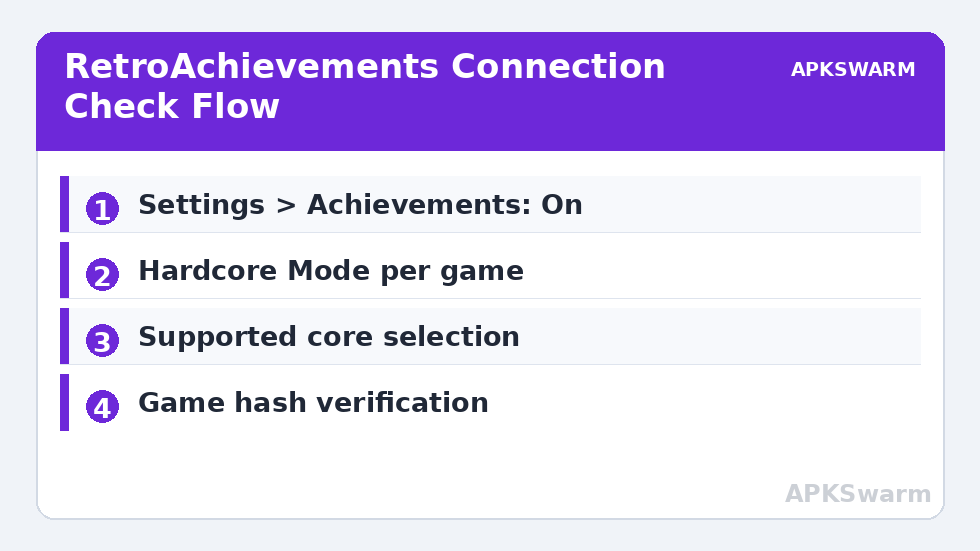
Register at retroachievements.org in your browser and confirm the email address. The password you set there is what every emulator will use, and RetroAchievements supports connecting through an API key model in newer integrations, but RetroArch on Android still uses the classic username and password login. In RetroArch, go to Settings > Achievements, turn Achievements on, then enter your details under Username and Password. Back out so RetroArch saves the configuration, then fully close and reopen the app. On reopening, load a supported game and you should see a login notification confirming how many achievements that game has.
Under the same Achievements menu, set Achievement Notifications to your preference and enable Unlock Sound if you want audible feedback. Turn on Show Leaderboard Notifications only if you play games with leaderboard support, because racing and score-attack titles can generate frequent popups. Enable Automatic Screenshot if you want RetroArch to capture the moment of each unlock for your own records. None of these display options affect whether achievements register on the server, which depends only on login, core support, and game hash.
A critical detail: achievements only work with your own dumped game files that match the hashes in the RetroAchievements database. A modified, translated, or differently dumped copy of the same game may load and play perfectly while earning nothing, because the hash check fails. If the login message says the game has no achievements or is not recognised, check the file version before changing any account settings. If you are new to RetroArch itself, pair this guide with our RetroArch Android beginner setup guide for core installation and playlist basics.
Setup RetroAchievements RetroArch Android Options That Matter
The most misunderstood option is Hardcore Mode. With Hardcore Mode on, save states, rewind, fast-forward beyond normal use, cheats, and slow-motion are disabled while playing, and achievements earn the hardcore badge and full points value. With it off, often called softcore, you can use save states freely but unlocks are worth less recognition and are marked differently on your profile. Neither mode is wrong. A sensible approach is hardcore for games you know well and softcore for first playthroughs of difficult RPGs. Toggle it in Settings > Achievements > Hardcore Mode, but note that changing it mid-session usually requires reloading the game to apply cleanly.
Next, check Settings > Saving and Settings > Frame Throttle interactions. Rewind under Settings > Frame Throttle > Rewind conflicts with hardcore mode and will be ignored while hardcore is active. Save states still save in hardcore in some builds but loading them is blocked, which confuses players who think their states were deleted. They were not; switch to softcore, reload, and the states work again. Our separate guide to configuring fast-forward and rewind hotkeys on a gamepad covers the mapping side if you play mostly in softcore.
Core support is the other gate. Not every RetroArch core reports achievements. The widely supported choices include Gambatte and mGBA for handheld titles, Snes9x and bsnes-based cores for 16-bit games, Genesis Plus GX for Sega systems, Beetle PSX HW and PCSX ReARMed for PlayStation, Flycast for Dreamcast, and PPSSPP as a core for PSP. If a core is not integrated with the RetroAchievements toolkit known as RALibretro-compatible hashing, the Achievements menu simply will not activate for that system. Update cores through Online Updater > Core Downloader, because achievement support and hash methods are corrected in core updates more often than in RetroArch itself.
Standalone Emulators That Support RetroAchievements
RetroArch is not the only route. DuckStation has native RetroAchievements under Settings > Achievements, where you log in with the same account and choose hardcore per game or globally. Its implementation is excellent and shows the full achievement list in the pause menu. PPSSPP added native support under Settings > Tools > RetroAchievements in recent versions, again with the same login. Dolphin added RetroAchievements for GameCube titles, found under Config > RetroAchievements in current builds, though its supported set is smaller and still growing. Standalone support matters because many players prefer these apps’ interfaces; our PPSSPP graphics settings guide and Dolphin profile pair naturally with an achievement setup in the same app.
To log in on a standalone, use the identical username and password, wait for the confirmation toast, and then load a game. Do not create a second account for a second emulator. All unlocks consolidate onto one profile, one points total, and one public history, which is the entire point of the platform. If a standalone offers a Test Game or shows achievements as locked grey entries in a list, the connection is working even before you earn anything.
All figures are estimates based on typical titles and stock settings; individual games vary widely.
Troubleshooting: Logged In but Nothing Unlocks
Work through this order. First, confirm the game is listed on retroachievements.org and note its exact supported file version and core. Second, confirm you are using a listed core at a recent version. Third, check the hash: RetroArch shows the recognised game name in the achievement notification at load; if it shows unknown game, the dump does not match, and you should re-dump from your own disc or cartridge with a standard method rather than patching files. Fourth, confirm you are online at the moment of unlocking. Achievements earned offline are not reliably cached across all cores, so a flight-mode session can lose unlocks even though the popups appeared. Fifth, check hardcore restrictions: if a cheat was active or a save state was loaded earlier in the session, some cores flag the session and block hardcore unlocks until the game is hard reset.
On performance, RetroAchievements itself costs almost nothing on any Snapdragon tier, because it is hash checking and server communication, not extra rendering. The cost comes from the features hardcore mode forbids you to lean on, like rewind buffers, which actually reduces load. On 6xx devices, achievement play in RetroArch is effectively free. On all tiers, keep Settings > User Interface > Notifications enabled so you do not miss the login error messages that explain most failures in plain text. For more profiles and per-system tuning, see the Emulation Configs archive.
Before a long session, do a sixty-second verification run: load the game, confirm the login notification names the correct title and achievement count, earn or trigger nothing important, and check your profile page in a browser to confirm the game now appears under your recent activity. That single check separates account problems from gameplay problems while the fix is still trivial, and it prevents the worst outcome in this system, finishing a difficult section only to learn the session was never connected.
Frequently Asked Questions
Is a RetroAchievements account free and do I need a separate one per emulator?
Yes, the account is free, and no, you use the same single account everywhere. Enter the same username and password in RetroArch, DuckStation, PPSSPP, and Dolphin, and all unlocks combine onto one profile and points total.
What is the difference between hardcore and softcore mode?
Hardcore mode disables save states, rewind, cheats, and slow-motion while you play, and unlocks carry the hardcore badge. Softcore allows those helper features but marks unlocks as softcore. Choose per game based on how well you know it.
Why does RetroArch say my game is not recognised?
The file hash does not match the version registered on RetroAchievements. This usually means a modified, translated, or differently dumped copy. Re-dump the game from your own disc or cartridge using a standard method and load that unmodified file instead.
Do achievements unlock while I am offline?
Not reliably. Some cores cache unlocks and some lose them if the server cannot be reached at the moment you earn them. Stay online while playing achievement-enabled games, especially for one-time story or boss achievements.
Which standalone emulators support RetroAchievements on Android?
DuckStation, PPSSPP, and current Dolphin builds all include native RetroAchievements login with the same account used in RetroArch. Log in inside each app’s achievements settings, load a supported game you own, and unlocks post to your shared profile.